
States
The campaign state can be managed to put the campaign in a specific stage of its life. Certain activities are therefore enabled or disabled.
Every new campaign is by default put in In preparation state. In preparation, states enable all the settings, flow and content to be modified. From there, the campaign can be put in an Active state. In an Active state, the campaign can only have its content and settings modified, while the campaign flow can not be modified. An active campaign can be Paused, Canceled or put in a Completed state. The completed state is the final state campaign can be in.
How the campaign state can be switched is displayed in the diagram below.
stateDiagram-v2
    [*] --> InPreparation
    InPreparation --> Active
    Active --> Pause
    Active --> Canceled
    Active --> Completed
    Pause --> InPreparation
    Pause --> Active
    Pause --> Canceled
    Pause --> Completed
    Canceled --> InPreparation
    Completed --> [*]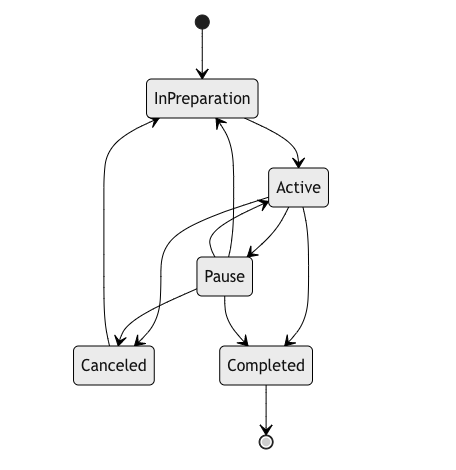
Campaign states

Campaign flow can only be modified in In preparation state.
To successfully activate the campaign, verification text must be entered. In case the campaign is set as a test campaign, TEST must be entered, otherwise, LIVE to activate the live campaign.
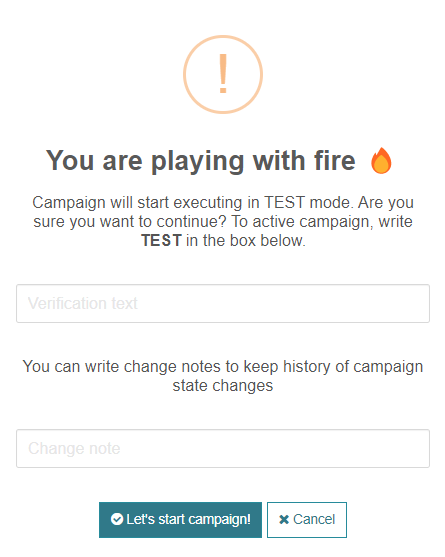
Campaign activation